Apple Watch Series 3 and Watch OS 4
History
L and I have been wearing the Apple Watch "Series 0" (The original version) since it was released. They have become a welcome part of our daily wardrobe. We use them for notifications, workouts, controlling the lights, using Apple Pay, and even telling the time. They are a second more intimate screen for our phones.
Every OS release for the watch has added new features and fixed issues and annoyances with the older versions. Every release has also left the original watch feeling a little slower and little less responsive.
Series 3
We chose the non-LTE Aluminum Series 3 this time around. The same sizes as before, but without the space-grey finish. I got the 42mm and L again got the 38mm. We can use all of the watch bands from the older watch.
Why no LTE? The extra upfront price for LTE combined with the $10 monthly fee per watch just weren't worth it to us. We don't find ourselves wishing we could use the watch to make calls or play music in situations where we do not have our phone with us more than a few times a year. I think we can disconnect for a few hours without missing this feature. I'm sure this will be a great feature in the future.
Water resistance is a great feature that we are happy to have. Not worrying about a rainstorm or a trip to the pool will be nice.
The speed and responsiveness of the Series 3 is night and day compared to the original watch. Everything is faster. This is all the justification needed to update.
The battery life of the Series 3 is amazing. I can easily got 2 days between charging now. With Watch OS 4 I was just making it through a day with the Series 0.
Watch OS 4
Watch OS 4 brings a number of refinements that remove confusion and simplify the watch. There are welcome improvements to the heart rate monitoring, workouts, and list view for the awful application grid. The new Siri watch face has promise, but it needs 3rd party app integration. The Toy Story watch faces are cute, but not something I'm likely to use.
The new Now-Playing screen now lets you change the volume with the crown. Finally! Much easier way to the adjust the volume. I use this every time I cut the grass and I have no idea why it was not this way from the start.
Wants and Desires
Watch OS 4 does a better job of showing the watch face when I turn my wrist. But, I still wish there was a subdued always on time. You can find this feature on competitors devices. Apple just needs to find a way to do this with the Apple Watch that maintains the great battery life.
Custom Watch Faces. I expected Apple to release a Watch Face API by now. There could be a whole section of the Watch App Store dedicated to this. I know there are issues with managing intellectual property theft here. But, it just makes so much sense to allow people to design and sell their own watch faces.
Conclusion
L and I both very happy with this upgrade. It was worth the wait and we have very few complaints. Time will tell if we will regret not getting the LTE version of the watch.
iOS 11 Beta 1 and the iPad Pro
I took the unrecommended step of installing the iOS 11 beta on my iPad Pro last night. I normally wait till the 3rd or 4th beta before taking a look at whats new. This time things are different. I could not wait to give the dramatic changes to the OS a try.
A small disclaimer first, do not try this at home, i'm what you call a professional. This is an early beta and I have already experienced a few unexplainable crashes. It was entirely likely that my iPad could have turned into an unresponsive block of aluminum. There were multiple reports of developers being unable to use their devices after the install.
DO NOT INSTALL THIS ON YOUR MAIN DEVICE!

Here are some of my initial impressions.
Files
The iCloud Drive app is now a part of a new application called Files. This is a major change by Apple that will vastly improve productivity on iOS. It's still an early beta though and there are some issues with knowing where a file you save is going. I did not see a way to control where saved files go first? I also do not understand how the new "On my iPad" section works. Hopefully this will become clear as new functionality is completed and bugs are fixed.
The Dock
Big changes to the dock, functionality was intuitive. Seems to work very well without any apparent bugs. One of those changes that seems obvious after you see it. I could see some variation of this coming to the iPhone in the future.
Multitasking Improvements
This works in conjunction with the new Dock, but it took me a bit to figure out how to use the new multitasking gestures. I ended up having to Google it. Overall I think these changes make it easier to use multitasking on the iPad. However, I think there may be some ways to make things easier to discover, maybe a tutorial video that you can watch when you first update?
Drag and Drop
This is another tent-pole feature that should have been here from day one. This will help to increase the number of people who are able to use an iPad as their primary computing device. Works like you would expect, drag selected text, images, etc... The applications have to support it, but I'm sure every app will as soon as possible.
Apple Pencil
I don't have the new iPad Pro yet, so I can't see how the new refresh rates impact drawing and writing responsiveness yet. The new markup features in the Notes app and in multiple other locations are big improvement. I'm sure these changes will make the Apple Pencil a required accessory for anyone trying get work done on the iPad. It's not just for people that want to draw or take a few hand written notes.
Being able to search for hand written notes is a game changer for me, and may drive me back to the notes app from Notability. I hope they are able to take advantage of some of these features.
I can't wait to explore the other changes in iOS 11. I was already using my iPad daily. These changes make it an even more important tool for me. Now, if they can figure out how I can to desktop style development tasks on an iPad without feeling like I have one hand tied behind my back...
Apple Watch Cont.
How are you liking it?
I'm enjoying wearing a watch again, way more than I thought I would. I have spent a bunch of time tweaking notifications to reduce distractions. I'm currently seeing:
- Activity - more on that later.
- Calendar
- Email - Work and VIP
- Maps
- Messages
- Passbook and Apple Pay
- Phone Calls - I have not had a phone call on the watch yet.
- Reminders
- Dark Sky
- Pedometer
- Slack
- Trello
- Twitter - DMs only
- Paper - Facebook messages only
I'm not sure if occasionally looking at my watch is less distracting that using my phone, but I feel like I'm spending less time messing with my phone when I should be talking to people.
I do seem to notice alerts on the watch more than on my phone. I hate being late to meetings or really any event. The watch really helps me know when I'm supposed to be somewhere.
I have not had anyone ask me about the watch in public. I have also not noticed anyone else wearing one. They seem to be very rare, and I have been preoccupied with looking at peoples wrists. The only place I have noticed them was at the Apple Store, and that really does not count.
Just Keep Moving
The activity app has been good for me. I was already using the Step counter in my iPhone, but the watches constant nagging and reminders has really helped me be conscious of my sloth like life. I get excited when I get one of the goofy awards on the watch. I try to actually move around when the watch tells me to Stand, and I'm trying to exercise more to get all the rings in the activity app.
Watch Faces
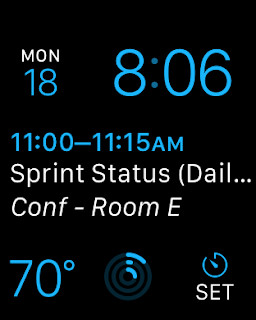
For work I'm using the Modular Watch Face. Lots of information with a prominent calendar display. I love having the timer on the watch face so I can quickly setup a timer for hot tea.
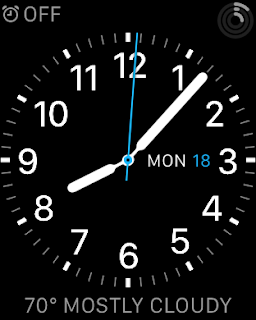
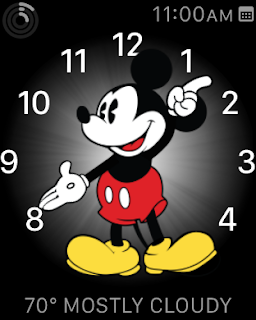
On the weekends I tend to prefer the Utility face, or the Mickey face. I leave the Calendar display off to avoid the "No More Events" text.
Apple Watch
Well, I got the Apple Watch. So far I'm very impressed with it.
The Tattoo Issue
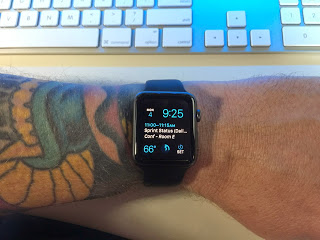
First read this article at iMore for more info on the issue.
In summary tattoos can interfere with the green light used for heart rate and security. My watch shipped the day this information started being discussed. I was worried that the issue would be bad enough for me to have to return the watch. I probably would have just turned off several features and kept it. But, I really did not want to have to make that choice.
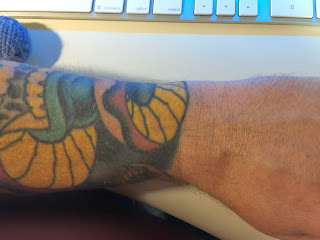
For me, the tattoo issue seems to be no big deal. It could be because of the inks my artist used, or more likely because of where the watch sits on my arm. There is a patch of yellow right where the watch naturally sits on my arm.
I have had no issues that I think were caused by my tattoos. It is possible that it is detecting my heart rate incorrectly. But, it seems consistent with values I have gotten from other sources.
I have had my watch lock while on my wrist twice. The first time was while using the lawn mower. Sweat was involved and I think the watch may have been too loose. The second time was while sitting idle on the couch, but I had my arm in a weird position and the watch was being pushed away from my arm.
Setup
Pairing was easy, I chose to activate all my apps, and this may have been a mistake. The first 20 min with the watch were slow and irritating. I think the phone was copying info to the watch, but there was no clear indication that this was happening. I got frustrated with things not working and left it alone for about an hour. The next time I tried to use it everything worked great. The setup process needs some work.
Everyday use
I have only had the watch for one weekend, so this can't really be a full review. However I have found the following things to be true:
It is a great fitness tracker.
I need to calibrate it better for my stride. But so far the way it tracks 'Active Calories' and reminds me to be more active is really helpful.
It is really good at notifications.
It is going to take some time to configure the correct set of notifications I want to go to the watch. I only want 'Important' items to show up there. I only want sound in some rare cases. etc... I will be tweaking these things until I find the right balance. Letting everything through would be awful.
It is good at being a watch.
I like having a watch on. At a glance information without pulling out my phone. I wish it had a mode where the time was always visible without the battery cost. Perhaps a future version will do a better job of detecting the wrist turn.
Apps
Some are pretty slow. Some don't really seem that helpful. For instance, there is a Yelp app on the watch, but It doesn't seem to support checking in, which is pretty much the only reason I would use Yelp on my watch. There are other instances of this. I've already removed several apps.
iPad Rev 3
On March 7th 2012 Apple announced the latest version of the iPad. I'll call it iPad 3 cause it's easier, but Apple calls it the iPad (3rd generation). For the record the name change doesn't bother me at all. You can find a run down of the new features all over the internet. But it boils down to:
- Retina display
- Larger battery and improved graphics processor to support the new screen
- Updated Camera with 1080p video recording.
- LTE / 4G support on AT&T and Verizon
- New software and updated software to take advantage of the new screen.
So... What did I get? I got the 32g Wifi only iPad 3. I'm now wishing I had gotten the Verizon LTE version just so I would have the option of using it. However our iPad 1 had 3G and we used it only once. So for now I'll settle with what I got. Maybe I'll get it in the iPad 4.
Should you get it? If you don't have an iPad then absolutely. If you have a 1st or 2nd gen iPad, then I dunno, really a personal decision. I got it cause I like to mess with the new stuff and just because I wanted it. :)
Mini-Review:
- The display is amazing
- I haven't played any games yet that really take advantage of the new graphics processor. However, a few of my drawing programs seem laggy when drawing. Not all of them, I think this is simply due to the apps needing to draw more pixels, combined with the apps not being updated / optimized for the new iPad.
- The new camera takes decent pics, gonna do some video to play with the new iMovie, I might post something here.
- iPhoto for the iPad is awesome. Gonna delete some other apps.
The new Apple TV has 1080p support now which you can notice depending on the content you are viewing. The bigger news is the new Apple TV software. It made the 2nd gen. Apple TV seem much faster. And the "App centric" interface changes might hint at more Apple TV Apps coming.
Now back to Draw Something...
iPhone 4S and Siri
Like a technology zombie I stumbled to my computer and pre-ordered the iPhone 4S as soon as I was able to. I used the excuse that I'm gonna do more iOS app development and it will be good to have the latest phone for testing. But, the real reason is that I'm a nut.
Was it worth it. For people with an iPhone 4, probably not. iOS 5 is a major upgrade that will keep the iPhone 4 users happy for a long time.
The one major reason to get the iPhone 4S is for the camera upgrade. The improved resolution and performance combined with the Camera improvements in iOS 5 are all great reasons to get the new phone.
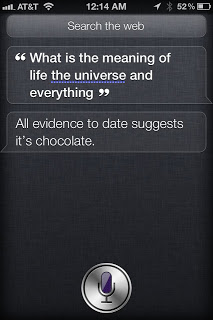
What about Siri? It's freaking wonderful. It does a great job of recognizing voice and converting it to text. And I hope that once it leaves Beta it will become available to more Apple devices (crosses fingers for iPad 2 support). Apple will most likely add support to many more applications. Siri's syntax will improve and include many more things you can ask it to do.