I Give Up
I tried for so long to only game on the Mac. And, it is possible. There are some great games on the Mac. But, so many games are never ported, or are ported badly. Many others that used to work, no longer work, due to the 64 bit transition.
So I bought an Alienware R8 with a 2070 Super. It's not top of the line, but it can play games. I won't be using it for much more than that.
I'm really curious to see what happens with Apples transition to Arm based Apple Silicon. But, for now I'll be doing most of my gaming on a PC again.
Fun to Learn
I haven't been keeping up with the latest changes to Swift and the iOS. This has been keeping me from updating existing apps on the store. I have also wanted to update and bring some of my old apps back. I have a few ideas for new apps that I would like to create as well. So, I have been spending a bunch of time working on improving my iOS development skills, and getting up to speed on the current state of iOS development.
Wow, things have come along way. I was never a big fan of Objective C. It has some great features that really helped, but it always felt old and cumbersome to me. Swift seemed like the future right from the beginning. It feels like a modern language to me. The new versions of Swift have improved and evolved the language in wonderful ways. Perhaps more importantly, I enjoy writing code in Swift.
I have been using a Paul Hudson's Hacking With Swift site to get back up to speed. I think his teaching style and pragmatic approach is very compatible with my own coding preferences. He has a large number of guided videos on YouTube that are great when combined with the content on his site and in his books. He also does an amazing job at updating everything for the latest language updates.
DispatchQueue.global().async {
	do {
		let data = try Data(contentsOf: url)
		let downloadedData = try self.decode(type, from: data)
		DispatchQueue.main.async {
			completion(downloadedData)
		}
	} catch {
		print(error.localizedDescription)
	}
}
I have headed down this path before. What makes it different this time?
Honestly I don't know, but it feels different. I feel more committed to getting something new released this time. But, only time will tell. Will I stick with it, and dedicate my free time to it? I intend too, and I hope I do. There is nothing like the feeling of setting a difficult goal for your self and reaching it.

3rd Gen iPad Pro
Apple just released several great updates to existing products. The most significant update was to the iPad Pro. I have been a huge fan of the iPad Pro and the Apple Pencil since the first version was released. This update has refined and improved the iPad Pro in almost every way.
Specs
- 11 inch, and 12.9 inch screens
- Both available in silver and space gray
- Sizes for both in 64GB, 256GB, 512GB, and 1TB
- Improved speakers and microphones
- Home Button replaced by Face ID camera system
- Not a feature but worth mentioning: Headphone jack removed due to reduced thickness.
- USB-C connector replaces Lightning conector
- 18W power brick included
- A12X 64-bit processor
- Improved cameras
What I ordered
I got the 12.9 inch, space gray, 256GB LTE iPad Pro. This is the first time I have paid extra for the LTE option, and I only plan on using it when I need extra conectivity. I wanted to get more storage this time, but I could not justify the added price for it. I was already ok with the larger iPad Pro, but this generation physical size actually got smaller while keeping the same screen size. It feels perfect now.
I also got the new Apple Pencil, which charges wirelessly while connected to the iPad case via magnets. The pencil is a little smaller. It has a new double tap feature for tool selection in apps that support it. Also, there is no longer a cap to lose. Pairing is done wirelessly when the pencil is connected to the side of the iPad.
I once again got the Smart Keyboard. Its a little better this time around, but still not perfect.
Pros
- This is a nearly perfect device. It feels great, it looks great, I love using this device.
- The pencil is always charged and I don't have to worry about losing the cap.
- Application updates are rolling out with support for the pencil double tap.
- This thing sounds amazing, not as good as the HomePod, or a real stereo system. But, for travel this will be a great way to play music.
- iOS keeps getting better.
- How fast is this thing, It handles everything with ease.
- With USB-C the dongles I already purchased for my Macbook Pro can now be used with the iPad as well.
Cons
- This is an expensive luxury item. I wish it was cheaper. I would have bought more storage if it was cheaper.
- Why does it come with the short USB-C cable. They sell a longer cable, it needs the longer cable.
- No headphone jack is a bummer, but understandable. I can't remember the last time I plugged headphones in to my iPad.
- iPad does not support external storage connected via USB-C. There are apps that can do this, but this should be supported by the OS directly. I'll be shocked if this is not in the next version of iOS.
- I should be able to develop iOS apps on iOS. The OS upgrades that are needed to support this take iOS from a Mac companion to a Mac replacement.
- No mouse and trackpad support. I need a cursor sometimes.
- The Apple Smart keyboard does not have media keys. I want the standard set of keys.
HomePod Mini Review
So I got a HomePod. I did not previously own any of the other dedicated Voice assistant devices. I could talk to my phone, and my watch, and my TV. But, the power of a dedicated, always listening assistant is just more useful. I have used the Amazon device in other environments and thought it was pretty cool. But, I'm all in on the Apple eco-system.
My short review is it's great. I think it will get significantly better in the near future.
Sound Quality
This small speaker sounds great. It does not sound better than my huge Stereo. I won't be using it when I watch movies, but it is ideal for casual music in the kitchen or in the bedroom. When cooking or preparing to start or end the day is when it shines.
Siri
Say things like:
- "Hey Siri play some music."
- "Hey Siri shuffle Steely Dan."
- "Hey Siri start a timer for 10 minutes."
- "Hey Siri whats the weather for tomorrow."
- "Hey Siri turn all the lights off."
- "Hey Siri set the thermostat to 68."
- etc....
Siri will most of the time hear you correctly and do what you want. But, you need to know how to ask for what you want. Trial and error will eventually train you. All the same issues you have with Siri on the phone are here. Contextual conversation often fails. Siri can't do some things that other devices can. You can only have one timer at a time. You can set alarms and reminders.
Siri needs more 3rd party APIs. Continue to develop and extend the limited apis already added to Siri. Add new apis. Let Spotify decide whether to develop an integration. Let Overcast develop an integration, etc... I'm sure this will happen. I wish it would happen faster than Apple typically moves.
Siri needs to be consistent everywhere Siri can be used. The phone should be no different than the desktop, which should be no different than the HomePod.
Siri also needs to support multiple users on the HomePod. I'm sure Apple wants this to be based on the person speaking. Not asking for a new profile to be active. However, profile switching would be good enough for now.
Conclusion
If you use Apple Music. Don't mind talking to Siri occasionally on your phone. Have a place in your home where a good speaker would be nice. Then sure give it a try. Don't buy it based on the possibility of future features. It does more than enough to justify the purchase. If you already have Echo and are happy with it, maybe skip the HomePod.
I liked it so much that I already bought a second one.
iPhone X
I've had the iPhone X for about a week now. Here are a few of my thoughts.
Pros
The screen is bright, vibrant, and super colorful. OLED has issues, but this is a well implemented screen. It has none of the artificial punch up of colors and contrast you see on some phones. Accurate and precise color representation.
Face ID takes some getting used to. You have to retrain yourself. iPhone users have gotten used to using Touch ID and the scenarios where it does and doesn't work. Face ID works great, but has a different set of cases where you have to re-learn when it will or won't work. If you have "Attention Detection" on, which you probably should, then you need to actually look at the phone to unlock it. With Touch ID, you could unlock it as you picked the device up. After a week Face ID is already beginning to feel natural.
The A11 Bionic processor in the iPhone X is the same processor in the iPhone 8. It's super fast and very energy efficient. Apple is getting better and better at processor design.
Battery life seems better to me than on my iPhone 7+. This could just be that its a newer device with fewer recharge cycles. Or, I could just be wrong. Either way, it lasts all day.
Wireless Qi charging is convenient and easy. If you have a metal case then your out of luck. I have a cheap charger on my desk at work and on my nightstand at home. I got the Anker wireless Charging Pad from Amazon.
Cons
The new gesture for the Control Center can be awkward with one handed use, but in practice I'm not having problems with it. I have a bigger issue with the difference in animation between Control Center and the other "Pull Down" animations for search and notifications.
This is an expensive phone. It's a luxury item. It's also the main computing device I interact with when I'm not working. We will follow our normal keep it for two years and then sale it. We normally get $200 to $300 when we re-sale iPhones. I'm betting the iPhone X may even sale for more.
Conclusion
It's a great device. It's not perfect, but most of the minor issues I have are fixable with Software updates.
Apple Watch Series 3 and Watch OS 4
History
L and I have been wearing the Apple Watch "Series 0" (The original version) since it was released. They have become a welcome part of our daily wardrobe. We use them for notifications, workouts, controlling the lights, using Apple Pay, and even telling the time. They are a second more intimate screen for our phones.
Every OS release for the watch has added new features and fixed issues and annoyances with the older versions. Every release has also left the original watch feeling a little slower and little less responsive.
Series 3
We chose the non-LTE Aluminum Series 3 this time around. The same sizes as before, but without the space-grey finish. I got the 42mm and L again got the 38mm. We can use all of the watch bands from the older watch.
Why no LTE? The extra upfront price for LTE combined with the $10 monthly fee per watch just weren't worth it to us. We don't find ourselves wishing we could use the watch to make calls or play music in situations where we do not have our phone with us more than a few times a year. I think we can disconnect for a few hours without missing this feature. I'm sure this will be a great feature in the future.
Water resistance is a great feature that we are happy to have. Not worrying about a rainstorm or a trip to the pool will be nice.
The speed and responsiveness of the Series 3 is night and day compared to the original watch. Everything is faster. This is all the justification needed to update.
The battery life of the Series 3 is amazing. I can easily got 2 days between charging now. With Watch OS 4 I was just making it through a day with the Series 0.
Watch OS 4
Watch OS 4 brings a number of refinements that remove confusion and simplify the watch. There are welcome improvements to the heart rate monitoring, workouts, and list view for the awful application grid. The new Siri watch face has promise, but it needs 3rd party app integration. The Toy Story watch faces are cute, but not something I'm likely to use.
The new Now-Playing screen now lets you change the volume with the crown. Finally! Much easier way to the adjust the volume. I use this every time I cut the grass and I have no idea why it was not this way from the start.
Wants and Desires
Watch OS 4 does a better job of showing the watch face when I turn my wrist. But, I still wish there was a subdued always on time. You can find this feature on competitors devices. Apple just needs to find a way to do this with the Apple Watch that maintains the great battery life.
Custom Watch Faces. I expected Apple to release a Watch Face API by now. There could be a whole section of the Watch App Store dedicated to this. I know there are issues with managing intellectual property theft here. But, it just makes so much sense to allow people to design and sell their own watch faces.
Conclusion
L and I both very happy with this upgrade. It was worth the wait and we have very few complaints. Time will tell if we will regret not getting the LTE version of the watch.
New Apple Products - Quick Take
Apple Watch Series 3 with Optional Cellular
I love my Apple Watch, but I still have the "Series 0" Apple Watch. I'm ready for a new watch and I'm very happy to get the faster processor and the water resistance. I don't think the cellular option is for me, I don't use my watch in situations where I don't have my phone and need to get phone calls.
The new Sport Loop bands are super comfortable BTW.
Apple TV 4K
I know it's more expensive than other 4K streaming devices, but I'm very excited to get this upgraded Apple TV. We use the Apple TV everyday. It's the primary way we consume content on the TV. We do have an HDR capable 4K TV already. Anyone want to by a 4K Fire TV box?
iPhone 8 and 8+
I would have already ordered the 8+ except for the existence of the X. Faster processor, better camera, and wireless charging. All reasons I would have bought this phone.
4K video at 60 frames per second will make your video look great on the new Apple TV.
iPhone X
Face ID looks good, I expect it to be as good as Touch ID in every way except for a few cases. Like using Apple Pay. But, thats something I do more on the Apple Watch.
The OLED screen looks good in video, but I bet it's stunning in person. Every OLED screen I have seen has been great.
The Notch doesn't bother me. Developers can work with it, and will surely create some interesting interfaces that deal with the notch and the curved edges in new and surprising ways. The Notch seems to really bug some people, but I don't think it's that big of a deal. It will likely go away in a future phone, but I don't hate it.
Both cameras have optical image stabilization. This will make a big difference with low light images.
Plus everything I like about the iPhone 8+.
All Time Favorite Playlist
I was inspired by Shannon's 10-Pack of Songs. So here is a link to an "All Time Favorite" playlist of mine on Apple Music.
All Time Favorites - Apple Music Playlist by Donald Forth Sorry if you don't have Apple Music - It's what I use.
iOS 11 Beta 1 and the iPad Pro
I took the unrecommended step of installing the iOS 11 beta on my iPad Pro last night. I normally wait till the 3rd or 4th beta before taking a look at whats new. This time things are different. I could not wait to give the dramatic changes to the OS a try.
A small disclaimer first, do not try this at home, i'm what you call a professional. This is an early beta and I have already experienced a few unexplainable crashes. It was entirely likely that my iPad could have turned into an unresponsive block of aluminum. There were multiple reports of developers being unable to use their devices after the install.
DO NOT INSTALL THIS ON YOUR MAIN DEVICE!

Here are some of my initial impressions.
Files
The iCloud Drive app is now a part of a new application called Files. This is a major change by Apple that will vastly improve productivity on iOS. It's still an early beta though and there are some issues with knowing where a file you save is going. I did not see a way to control where saved files go first? I also do not understand how the new "On my iPad" section works. Hopefully this will become clear as new functionality is completed and bugs are fixed.
The Dock
Big changes to the dock, functionality was intuitive. Seems to work very well without any apparent bugs. One of those changes that seems obvious after you see it. I could see some variation of this coming to the iPhone in the future.
Multitasking Improvements
This works in conjunction with the new Dock, but it took me a bit to figure out how to use the new multitasking gestures. I ended up having to Google it. Overall I think these changes make it easier to use multitasking on the iPad. However, I think there may be some ways to make things easier to discover, maybe a tutorial video that you can watch when you first update?
Drag and Drop
This is another tent-pole feature that should have been here from day one. This will help to increase the number of people who are able to use an iPad as their primary computing device. Works like you would expect, drag selected text, images, etc... The applications have to support it, but I'm sure every app will as soon as possible.
Apple Pencil
I don't have the new iPad Pro yet, so I can't see how the new refresh rates impact drawing and writing responsiveness yet. The new markup features in the Notes app and in multiple other locations are big improvement. I'm sure these changes will make the Apple Pencil a required accessory for anyone trying get work done on the iPad. It's not just for people that want to draw or take a few hand written notes.
Being able to search for hand written notes is a game changer for me, and may drive me back to the notes app from Notability. I hope they are able to take advantage of some of these features.
I can't wait to explore the other changes in iOS 11. I was already using my iPad daily. These changes make it an even more important tool for me. Now, if they can figure out how I can to desktop style development tasks on an iPad without feeling like I have one hand tied behind my back...
Apple Watch Cont.
How are you liking it?
I'm enjoying wearing a watch again, way more than I thought I would. I have spent a bunch of time tweaking notifications to reduce distractions. I'm currently seeing:
- Activity - more on that later.
- Calendar
- Email - Work and VIP
- Maps
- Messages
- Passbook and Apple Pay
- Phone Calls - I have not had a phone call on the watch yet.
- Reminders
- Dark Sky
- Pedometer
- Slack
- Trello
- Twitter - DMs only
- Paper - Facebook messages only
I'm not sure if occasionally looking at my watch is less distracting that using my phone, but I feel like I'm spending less time messing with my phone when I should be talking to people.
I do seem to notice alerts on the watch more than on my phone. I hate being late to meetings or really any event. The watch really helps me know when I'm supposed to be somewhere.
I have not had anyone ask me about the watch in public. I have also not noticed anyone else wearing one. They seem to be very rare, and I have been preoccupied with looking at peoples wrists. The only place I have noticed them was at the Apple Store, and that really does not count.
Just Keep Moving
The activity app has been good for me. I was already using the Step counter in my iPhone, but the watches constant nagging and reminders has really helped me be conscious of my sloth like life. I get excited when I get one of the goofy awards on the watch. I try to actually move around when the watch tells me to Stand, and I'm trying to exercise more to get all the rings in the activity app.
Watch Faces
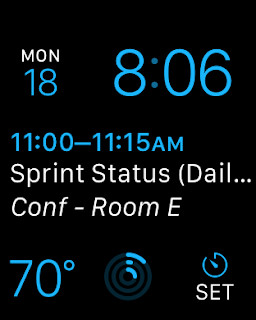
For work I'm using the Modular Watch Face. Lots of information with a prominent calendar display. I love having the timer on the watch face so I can quickly setup a timer for hot tea.
On the weekends I tend to prefer the Utility face, or the Mickey face. I leave the Calendar display off to avoid the "No More Events" text.