Apple Watch
Well, I got the Apple Watch. So far I'm very impressed with it.
The Tattoo Issue
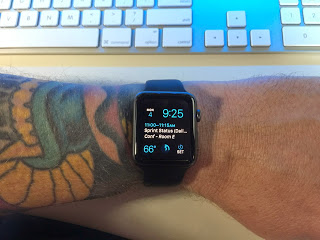
First read this article at iMore for more info on the issue.
In summary tattoos can interfere with the green light used for heart rate and security. My watch shipped the day this information started being discussed. I was worried that the issue would be bad enough for me to have to return the watch. I probably would have just turned off several features and kept it. But, I really did not want to have to make that choice.
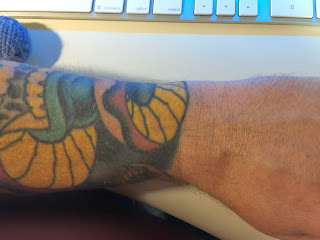
For me, the tattoo issue seems to be no big deal. It could be because of the inks my artist used, or more likely because of where the watch sits on my arm. There is a patch of yellow right where the watch naturally sits on my arm.
I have had no issues that I think were caused by my tattoos. It is possible that it is detecting my heart rate incorrectly. But, it seems consistent with values I have gotten from other sources.
I have had my watch lock while on my wrist twice. The first time was while using the lawn mower. Sweat was involved and I think the watch may have been too loose. The second time was while sitting idle on the couch, but I had my arm in a weird position and the watch was being pushed away from my arm.
Setup
Pairing was easy, I chose to activate all my apps, and this may have been a mistake. The first 20 min with the watch were slow and irritating. I think the phone was copying info to the watch, but there was no clear indication that this was happening. I got frustrated with things not working and left it alone for about an hour. The next time I tried to use it everything worked great. The setup process needs some work.
Everyday use
I have only had the watch for one weekend, so this can't really be a full review. However I have found the following things to be true:
It is a great fitness tracker.
I need to calibrate it better for my stride. But so far the way it tracks 'Active Calories' and reminds me to be more active is really helpful.
It is really good at notifications.
It is going to take some time to configure the correct set of notifications I want to go to the watch. I only want 'Important' items to show up there. I only want sound in some rare cases. etc... I will be tweaking these things until I find the right balance. Letting everything through would be awful.
It is good at being a watch.
I like having a watch on. At a glance information without pulling out my phone. I wish it had a mode where the time was always visible without the battery cost. Perhaps a future version will do a better job of detecting the wrist turn.
Apps
Some are pretty slow. Some don't really seem that helpful. For instance, there is a Yelp app on the watch, but It doesn't seem to support checking in, which is pretty much the only reason I would use Yelp on my watch. There are other instances of this. I've already removed several apps.
The Apple Watch, the iPhone 6, and the iPhone 6 Plus
On Tuesday, while we were having a blast in the Magic Kingdom, Apple announced the new iPhone 6 and iPhone 6 Plus. Like everyone else that was following along with the rumors and leaks, I knew what to expect with the new phones. They look like great upgrades especially when combined with iOS 8. I watched the keynote sitting in the lobby of the Wilderness Lodge and I ordered an iPhone 6 Plus Friday morning as we were leaving Disney World.
Apple also announced the long rumored Apple Watch. For me, the watch is more interesting than the new phones. I like the idea of glancing at my wrist to see if something requires more attention. I'm curious about the health tracking abilities and how they will enhance what I'm already getting from the motion co-processor in the iPhone 5S. I'm even intrigued by the tap based 'intimate' communication interface that was shown. Looking forward to trying the watch out and seeing how it evolves in future iterations.
Mac Gaming and Keeping the Faith
When I switched to the Mac several years ago, the only big concern was access to PC games. But, there is dual booting, and there are virtual solutions, so I jumped in and never looked back. These days more and more games are coming out with support for the Mac on day one. But, I still find myself getting excited for a new game, only to be totally disappointed when I see that it is PC only.
Just suck it up and run windows.
My solution used to be exactly that. But, now I'm taking a different approach. I don't buy games that do not support the operating systems I use. I do not support developers that do not provide software for my platform. It is that easy and simple. Sure, I would like to play Space Engineers or Fable Anniversary, but they are not available on OS X. So just get on with your life already. :)
The best way to influence a company's behavior is with money. Don't buy it or do buy it. The choice you make will help them to make decisions going forward. Now I know I'm in a minority on this, and I know that my one purchase won't make a huge difference. But, it's what I can do. Oh, I also do not download the game illegally. Don't be that guy.
Must have iPhone Apps
I have hundreds of 3rd party apps on my phone. I use a few of them all the time.
Drafts
The Drafts app gives you one place to quickly type or paste text, and then do something with it. You can create custom actions to send that text to almost any service like Twitter or Facebook, or you can do something more complex like append the text with a time and a date to a specific file in your dropbox account.
Many people like to use alternative Twitter clients, but I find the main Twitter app to be more than sufficient for most of my twitter usage.
Vine
I don't create many Vine's myself, but I can waste a great deal of time watching other people get really creative with 6 seconds of video.
Riposte
The Riposte app is a great App.Net client, a twitter like service.
Google+
I use the Google+ app to read posts on Google+. Not much else to say here.
Love it or hate it, Facebook is the only way I communicate with some of my friends. The Facebook app gets the job done.
Yelp
Restaurant reviews and information. The Yelp app gets better with every update. Why don't more people use it?
YouTube
I watch an amazing amount of content on YouTube. I often use the YouTube app to stream videos to my Apple TV.
1Password
Store your passwords securely. Generate new passwords. Keep the data sync'd across your devices and computers.
Argus and Nike+ Move
The M7 chip in the iPhone 5s made has replaced the Fitbit. Argus and the Nike+ Move app can read the data stored in the M7 and show me that I should be exercising way more than I am.
Paper by Fifty Three
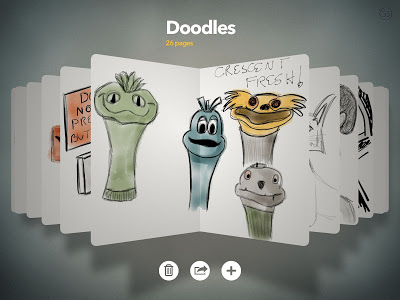
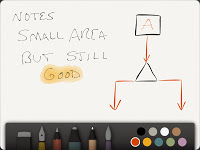
There has been a crazy amount of publicity for the new iOS app Paper by Fifty Three. There are several similar apps, but none of them are as fun to use as Paper. It has just the right level of simplicity with an easy to use interface.
The app is free but all the tools you will want to use are sold as separate in-app purchases. To get all the tools currently costs $7.99, and I think this is an ok value for the amount of time I have already used this application. Should they have charged for the app up front instead of doing in-app purchases? I dunno, some people hate in app purchases, others are ok with them.
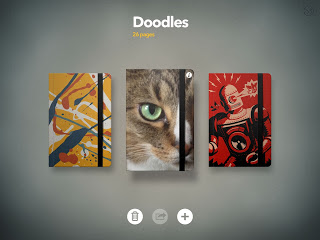
Pros:
- Beautiful and elegant application
- Easy to use tools
Cons:
- No way to save to Camera roll
- Can't zoom in - can't really decide if this is a bad thing.
- Would be nice to be able to move pages around in the notebook
- Would be nice to have the ability to change pages to lined or graphed
- In app purchases for the tools you actually want to use. Would be easier to swallow if they were $1.00 each instead of $1.99 each.
I would expect some of these issues to be fixed in future updates. I would also expect there to be new features sold via in-app purchases.
If you like to draw, and you have a stylus I would suggest getting this app.

iPad Rev 3
On March 7th 2012 Apple announced the latest version of the iPad. I'll call it iPad 3 cause it's easier, but Apple calls it the iPad (3rd generation). For the record the name change doesn't bother me at all. You can find a run down of the new features all over the internet. But it boils down to:
- Retina display
- Larger battery and improved graphics processor to support the new screen
- Updated Camera with 1080p video recording.
- LTE / 4G support on AT&T and Verizon
- New software and updated software to take advantage of the new screen.
So... What did I get? I got the 32g Wifi only iPad 3. I'm now wishing I had gotten the Verizon LTE version just so I would have the option of using it. However our iPad 1 had 3G and we used it only once. So for now I'll settle with what I got. Maybe I'll get it in the iPad 4.
Should you get it? If you don't have an iPad then absolutely. If you have a 1st or 2nd gen iPad, then I dunno, really a personal decision. I got it cause I like to mess with the new stuff and just because I wanted it. :)
Mini-Review:
- The display is amazing
- I haven't played any games yet that really take advantage of the new graphics processor. However, a few of my drawing programs seem laggy when drawing. Not all of them, I think this is simply due to the apps needing to draw more pixels, combined with the apps not being updated / optimized for the new iPad.
- The new camera takes decent pics, gonna do some video to play with the new iMovie, I might post something here.
- iPhoto for the iPad is awesome. Gonna delete some other apps.
The new Apple TV has 1080p support now which you can notice depending on the content you are viewing. The bigger news is the new Apple TV software. It made the 2nd gen. Apple TV seem much faster. And the "App centric" interface changes might hint at more Apple TV Apps coming.
Now back to Draw Something...
Scribblenauts Remix
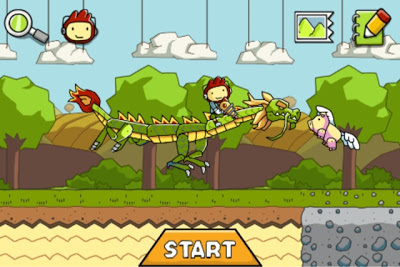
Scribblenauts Remix for the iPhone/iPod is an amazing creative and fun game. Give it a try.
http://www.scribblenautsremix.com
iPhone 4S and Siri

Like a technology zombie I stumbled to my computer and pre-ordered the iPhone 4S as soon as I was able to. I used the excuse that I'm gonna do more iOS app development and it will be good to have the latest phone for testing. But, the real reason is that I'm a nut.
Was it worth it. For people with an iPhone 4, probably not. iOS 5 is a major upgrade that will keep the iPhone 4 users happy for a long time.
The one major reason to get the iPhone 4S is for the camera upgrade. The improved resolution and performance combined with the Camera improvements in iOS 5 are all great reasons to get the new phone.
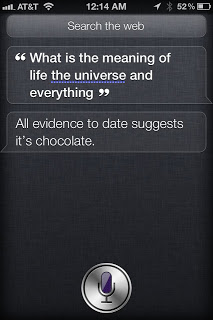
What about Siri? It's freaking wonderful. It does a great job of recognizing voice and converting it to text. And I hope that once it leaves Beta it will become available to more Apple devices (crosses fingers for iPad 2 support). Apple will most likely add support to many more applications. Siri's syntax will improve and include many more things you can ask it to do.
Super Easy Custom iPhone RingTones
Using the Macs built-in text to speech functionality it is super easy to create custom ringtones for the iPhone.
You Need:
- A Mac
- An iPhone
- iTunes
Open Terminal and create a ringtone audio file using the say command.
For example:
say -v Trinoids "Incoming Transmission" -o incoming.m4r
Pay attention to the folder you are in when you make this file, this will normally be your home folder.
Now go to iTunes and chose the menu option [File->Add To Library]. Navigate to the file you just created and select it. The audio file should be added to the Ringtones section of iTunes where you should be able to play it. Connect your iPhone or make sure it's on the same wifi network and appears in iTunes. Select your phone in iTunes and choose the Ringtones section. Make sure the new file is being synced by choosing "All Ringtones" or "Selected Ringtones" and checking the one you just added.
Now Sync your iPhone and TADA. The new ringtone should now be available for whichever alert you want to use it with.
For more information about the say command you can use man in the Terminal:
man say
for instance:
say -v ?
will give you a list of the available voices you can use.
iPhone 4S
Excited about the new iPhone 4S announced yesterday. The changes are incremental and for the most part totally expected. Better camera, faster processor, iOS 5, and then theres the one more thing, integration of Siri into the OS. Voice assistance on previous versions of the iPhone felt like an afterthought. The addition of Siri may result in a big change to my daily use of the iPhone.
So, will I get it? The answer is a very strong YES. what I should do is wait till my AT&T contract allows me to get the lower price, but what I'll most likely do is take the hit and pre-order the phone on Friday.