Apple Watch
Well, I got the Apple Watch. So far I'm very impressed with it.
The Tattoo Issue
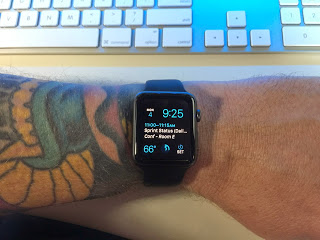
First read this article at iMore for more info on the issue.
In summary tattoos can interfere with the green light used for heart rate and security. My watch shipped the day this information started being discussed. I was worried that the issue would be bad enough for me to have to return the watch. I probably would have just turned off several features and kept it. But, I really did not want to have to make that choice.
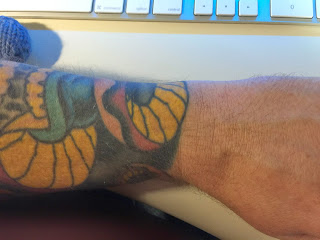
For me, the tattoo issue seems to be no big deal. It could be because of the inks my artist used, or more likely because of where the watch sits on my arm. There is a patch of yellow right where the watch naturally sits on my arm.
I have had no issues that I think were caused by my tattoos. It is possible that it is detecting my heart rate incorrectly. But, it seems consistent with values I have gotten from other sources.
I have had my watch lock while on my wrist twice. The first time was while using the lawn mower. Sweat was involved and I think the watch may have been too loose. The second time was while sitting idle on the couch, but I had my arm in a weird position and the watch was being pushed away from my arm.
Setup
Pairing was easy, I chose to activate all my apps, and this may have been a mistake. The first 20 min with the watch were slow and irritating. I think the phone was copying info to the watch, but there was no clear indication that this was happening. I got frustrated with things not working and left it alone for about an hour. The next time I tried to use it everything worked great. The setup process needs some work.
Everyday use
I have only had the watch for one weekend, so this can't really be a full review. However I have found the following things to be true:
It is a great fitness tracker.
I need to calibrate it better for my stride. But so far the way it tracks 'Active Calories' and reminds me to be more active is really helpful.
It is really good at notifications.
It is going to take some time to configure the correct set of notifications I want to go to the watch. I only want 'Important' items to show up there. I only want sound in some rare cases. etc... I will be tweaking these things until I find the right balance. Letting everything through would be awful.
It is good at being a watch.
I like having a watch on. At a glance information without pulling out my phone. I wish it had a mode where the time was always visible without the battery cost. Perhaps a future version will do a better job of detecting the wrist turn.
Apps
Some are pretty slow. Some don't really seem that helpful. For instance, there is a Yelp app on the watch, but It doesn't seem to support checking in, which is pretty much the only reason I would use Yelp on my watch. There are other instances of this. I've already removed several apps.
The Apple Watch, the iPhone 6, and the iPhone 6 Plus
On Tuesday, while we were having a blast in the Magic Kingdom, Apple announced the new iPhone 6 and iPhone 6 Plus. Like everyone else that was following along with the rumors and leaks, I knew what to expect with the new phones. They look like great upgrades especially when combined with iOS 8. I watched the keynote sitting in the lobby of the Wilderness Lodge and I ordered an iPhone 6 Plus Friday morning as we were leaving Disney World.
Apple also announced the long rumored Apple Watch. For me, the watch is more interesting than the new phones. I like the idea of glancing at my wrist to see if something requires more attention. I'm curious about the health tracking abilities and how they will enhance what I'm already getting from the motion co-processor in the iPhone 5S. I'm even intrigued by the tap based 'intimate' communication interface that was shown. Looking forward to trying the watch out and seeing how it evolves in future iterations.
Chromebook First Impressions
On a whim, I bought an ASUS Chromebook C300MA-DB01. I wanted to see if it could work as a secondary work computer. I don't have a laptop at work, and I'm not comfortable with leaving my Macbook Air there all the time.
I fully expected to be a little disappointed with the performance and screen quality. I also expected to be annoyed by the simplistic browser based OS. Wow! was I wrong. If you are ok with storing things in the cloud, and using Google services, then this might be a perfect second device. While on my work network, I can ssh into my main computer, I can remotely edit code, and I can test websites with chromes developer tools. All of my Chrome bookmarks and extensions were there the moment I logged in, and there's a good selection of apps on the app store.
The only problem I have had so far, is with getting my work VPN connection setup correct. The Chrome OS needs to provide easier setup for VPN configuration. However, based on information other Chromebook users have compiled, I should be able to get VPN working correctly. It's just not a simple configuration. If I use it mainly at work, I won't really need the VPN to work.
I could easily suggest this as a secondary cheap alternative to a table or laptop for my Developer friends. Some of the newer models even have better screens. But, don't expect something this cheap to blow you away with build quality.
I can easily suggest a Chromebook as a primary device for family members or normal people that do not require special software or graphics heavy games. Most people do not need more than this. And it's more secure and easier to use than Windows or Mac OSX.
Let us become more organized
We use the reminders app on iOS for sharing to-do's at home, along with a small white-board on the fridge. This works great for the kinds of things we do at home, and let's be honest, Lisa keeps things up to date, like a Boss.
But, at work it makes more sense to keep notes and to-do lists in text form. I work on multiple operating systems and I like to enter notes on whatever system is more convenient at that particular time. A while back I switched to Markdown for these documents. It lets me keep the files on Dropbox, and share them between Linux, Mac OS X, and iOS with little hassle. I thought I would share what I'm doing currently on each of these platforms.
Linux
- Node JS: I have a simple Server running on my Work Desktop that serves up all files in my share folder. One of the files in this folder is a symbolic link to a folder in Dropbox where I keep my work related markdown files. This server will serve up HTML versions of all my Markdown files. This lets me share and view these files easily.
- Sublime Text: I have a licensed copy of Sublime I use to edit my notes. I'm working on some Sublime plugins to help me with repeatable tasks.
Mac OS X
- Sublime Text: Works on all major desktop operating systems.
- NVAlt: I'm taking a look at this, but I'm not sure if I like the way files are managed.
iOS
- Drafts: Gives me the ability to quickly create and append to markdown documents stored on Dropbox. If I have a quick thing I need to add to a to-do list I can type it and choose where I want the text to go.
- ByWord: A simple Markdown friendly editor for iOS.
- Editorial: A great programmable editor for the iPad. I've created scripts for Editorial to add tasks to todo lists, mark them as complete, and even timestamp when they were completed.
General
- Mingle: We use Mingle to manage stories and tasks. I try not to duplicate the information stored here.
My Ever Changing Workflow
- I keep a separate directory for each sprint. Something like 'Work/2014/Sprint 7'. I have a script that creates a new directory and places empty files for things like a to-do list, planning notes, retrospective notes, and demo notes.
- If I need to add something to my to-do list for a sprint. I use Drafts, ByWord, or Sublime-Text. Which I use depends on where I am, what platform, and whether its a quick addition, or something more involved.
- If I need to share these notes with someone, I can simply give them a link to my desktop Node server. That way they will always have the latest version of the file.
- As I complete tasks I just add DONE.
I mentioned above that I'm writing some Sublime Text plugins to match what I have on Editorial. I don't always bring my iPad to work.
I hope this helps in some small way. I'm still trying to be more disciplined about updating my notes. I hope to evolve and update the tools I use while keeping it simple.
Angular Js and the New World Order
JavaScript is Dead, Long Live JavaScript.
Over the last couple of months my day job has been undergoing a transition. We decided to change our thinking about Web Applications. We realized just how far behind we were. Web Applications have changed. The wild west is being tamed. the structured MVC world we are used to in the back in, has moved into the browser. Instead of single pages being rendered after each request to the server, we have full featured stateful applications running in the browser. Meanwhile the servers, where much of this logic and state used to exist, have now become reusable restful data providers. The whole stack has shifted.
None of this is new of course. It's been going on for years, but I've only just poked my head out of the trenches and realized. In a broader sense it's the same transition that has been going on for years. So if like me you had not been paying attention Start Here:
Update
Well so much for Angular. I know many people are still using it. I personaly have become very into using React for small reusuable components. But, Angular was not at all popular in my company, very few people liked working with it. It was also very difficult for us to admit that there was any real benefit to using it for the projects that we had at the time.
Must have iPhone Apps
I have hundreds of 3rd party apps on my phone. I use a few of them all the time.
Drafts
The Drafts app gives you one place to quickly type or paste text, and then do something with it. You can create custom actions to send that text to almost any service like Twitter or Facebook, or you can do something more complex like append the text with a time and a date to a specific file in your dropbox account.
Many people like to use alternative Twitter clients, but I find the main Twitter app to be more than sufficient for most of my twitter usage.
Vine
I don't create many Vine's myself, but I can waste a great deal of time watching other people get really creative with 6 seconds of video.
Riposte
The Riposte app is a great App.Net client, a twitter like service.
Google+
I use the Google+ app to read posts on Google+. Not much else to say here.
Love it or hate it, Facebook is the only way I communicate with some of my friends. The Facebook app gets the job done.
Yelp
Restaurant reviews and information. The Yelp app gets better with every update. Why don't more people use it?
YouTube
I watch an amazing amount of content on YouTube. I often use the YouTube app to stream videos to my Apple TV.
1Password
Store your passwords securely. Generate new passwords. Keep the data sync'd across your devices and computers.
Argus and Nike+ Move
The M7 chip in the iPhone 5s made has replaced the Fitbit. Argus and the Nike+ Move app can read the data stored in the M7 and show me that I should be exercising way more than I am.
Replicator 2 Update
Well MakerBot support has been great. They sent me the filament tube, they sent me a replacement Thermocouple and instructions on how to replace it. So after a small surgery my printer is up and running. I do have a new support issue with them, wondering what I should do with a squeaky pulley. But, I'm sure they will help me with that as well.
Here's a short video of my printer running, hear the squeak? - Note: Video no longer available.
So far I have printed sample files, and things I have downloaded. My iPhone is sporting a printed case, and I have started printing a few X-Mas gifts for a friend. The quality I can get on the Replicator 2 is way beyond what my Printrbot was capable of.
Now I need to get working on some of my own designs.
3D Printer Stuff
I learned a bunch messing around with my LC Printrbot. But to be honest I got tired of the constant tweaking, and the looming need to print new gears to keep it running. So, I ordered a MakerBot Replicator 2. Expensive but still less costly than professional 3D printers. I hoped that I would get the Replicator 2 and with minimal maintenance I would be be able to print with no fuss.
UGH, so far not going well. The plunger based extruder is causing me problems. I'm getting an unexplained heat read error. And I think my Y axis belts are loose. I will have to perform some emergency fixes to even get started. This is not the experience I expected.
So far MakerBot support has been helpful and I hope that I'll be able to work through the issues and start using the printer like I want to. I'll update with more information once I get pass these issues. Hopefully I'll be able to give a better review then.
Update
I used the Replicator a bunch, but eventually Makerbot fell apart and was sold to a bigger company. They switched their focus to larger buisness needs and gave the low end market away. All of the effort that was spent on growing a community was wasted. Now I'm unable to update my printer easily and I'm likely to get something differnent. Maybe a Prusa.
Printrbot - Build and use.
It took longer than expected but the fine folks at Printrbot.com shipped my Kickstarter Printrbot LC a few weeks ago.
It took me 2-3 days to finish building my printer. Including a quik trip to Home Depot for some extra screws and nuts I was missing. I followed the construction videos that were posted on Youtube, and the guides available at Printrbottalk.com.
Without the Printrbot talk forum I would never have completed the construction. Towards the end of the build I ran into a couple of major problems.
First, the cable for the extruder stepper motor was too short to reach the controller board. I had to solder in 4 extension wires to make the connection.
Second, the main extruder gear was very wobbly and kept getting stuck at the same point. I emailed the Printrbot folks and they sent me both extruder gears, and replacement pulley gears. Great tech support. Looking back I think I could have gotten the original extruder gear working with a little careful grinding with my Dremel. I will still be printing another set of gears as backup. It seems these pieces are the most likely to fail over time.
After fighting the software used to communicate with the printer, I finally was able to make the bot move. Several days of tweaking later, and I'm starting to be able to print half way decent items. You can find an amazing assortment of things to print at Thingiverse.com.
I still have one major problem I have not been able to figure out. Occasionally, my bot locks up. It can happen when simply moving an axis or when I'm in the middle of a print. Thats a scrapped print. I'm still trying to figure the problem out. I may have to send another email to Printrbot for suggestions.
Things I've learned. This kit is very much a hobby kit, with all the little gotchas that you might not expect till you start using it.
- I really need to flat the shafts on the X,Y, and the Extruder steppers. I've already had problems with the Extruder loosening, and ruining a print.
- I need to add a fan to cool the plastic quicker, and make the prints more precise. Ordered from amazon, and printed a fan mount.
- I need lubricant for the threader rods. Ordered from Amazon.
- Every few times I print I need to check the various belts and pulleys to make sure they are tight and in the correct positions.
- I really need a spool for the plastic, and a way to mount it. My plastic filament is very tangled at the moment. Printrbot has a solution for this that I may get.
Things I think Printrbot could do better:
- Better instructions, more detailed if possible. Include getting through the first print. I was able to find the info I needed, but not everyone will. I would hate to see people give up in frustration.
- Include glass for the print bed. It shouldn't be that hard to buy and ship glass with the packaged.
- Include a mechanism for mounting glass on the print bed.
Conclusion:
- So far I have had a blast getting my printer running, and there are bunch of things I still need to learn and do to take advantage of this awesome tech.
- Using the bot is way more complicated than I realized it would be.
- If you have the money I might suggest getting the Replicator from Makerbot instead. However, it is 4 times the price.
The Nest
I wanted a Nest bad when they first came out, but I waited too long to order. When they recently became available again I ordered right away and a few days later we replaced our old "smart" thermostat with the shiny new Nest.
Imagine the change you went through when going from a dumb flip phone to the iPhone or other smart phone. That's what it's like with the Nest. It learns your schedule. It's very easy to change the temp whenever you need to, and you can do this directly, or via the web page, iPhone, or the iPad, and you can do all this remotely. Want to turn the temp up or down while an hour from the house? You can.
It's just works. Sound familiar? If you didn't know better you would think it was from Apple.