Apple Watch Series 3 and Watch OS 4
History
L and I have been wearing the Apple Watch "Series 0" (The original version) since it was released. They have become a welcome part of our daily wardrobe. We use them for notifications, workouts, controlling the lights, using Apple Pay, and even telling the time. They are a second more intimate screen for our phones.
Every OS release for the watch has added new features and fixed issues and annoyances with the older versions. Every release has also left the original watch feeling a little slower and little less responsive.
Series 3
We chose the non-LTE Aluminum Series 3 this time around. The same sizes as before, but without the space-grey finish. I got the 42mm and L again got the 38mm. We can use all of the watch bands from the older watch.
Why no LTE? The extra upfront price for LTE combined with the $10 monthly fee per watch just weren't worth it to us. We don't find ourselves wishing we could use the watch to make calls or play music in situations where we do not have our phone with us more than a few times a year. I think we can disconnect for a few hours without missing this feature. I'm sure this will be a great feature in the future.
Water resistance is a great feature that we are happy to have. Not worrying about a rainstorm or a trip to the pool will be nice.
The speed and responsiveness of the Series 3 is night and day compared to the original watch. Everything is faster. This is all the justification needed to update.
The battery life of the Series 3 is amazing. I can easily got 2 days between charging now. With Watch OS 4 I was just making it through a day with the Series 0.
Watch OS 4
Watch OS 4 brings a number of refinements that remove confusion and simplify the watch. There are welcome improvements to the heart rate monitoring, workouts, and list view for the awful application grid. The new Siri watch face has promise, but it needs 3rd party app integration. The Toy Story watch faces are cute, but not something I'm likely to use.
The new Now-Playing screen now lets you change the volume with the crown. Finally! Much easier way to the adjust the volume. I use this every time I cut the grass and I have no idea why it was not this way from the start.
Wants and Desires
Watch OS 4 does a better job of showing the watch face when I turn my wrist. But, I still wish there was a subdued always on time. You can find this feature on competitors devices. Apple just needs to find a way to do this with the Apple Watch that maintains the great battery life.
Custom Watch Faces. I expected Apple to release a Watch Face API by now. There could be a whole section of the Watch App Store dedicated to this. I know there are issues with managing intellectual property theft here. But, it just makes so much sense to allow people to design and sell their own watch faces.
Conclusion
L and I both very happy with this upgrade. It was worth the wait and we have very few complaints. Time will tell if we will regret not getting the LTE version of the watch.
The Element
Since I switched to the Fostex T50RP headphones, I have been having an issue with my "at work" DAC / AMP the Aune X1S. The Aune is just not powerful enough for the T50s. These are seriously power hungry headphones and maxing an AMP out is never a good idea. The Aune is great amp/DAC combo, but not for this usage.
So, I switched to JDS Labs The Element. More than capable of powering any pair of headphones you throw at it. There is something addicting about the large volume knob on top of The Element. It's a good feel interface that is superbly made. I also love that the DAC remains active with the power switch off. So my externally powered speakers can make use of it when I'm not using the headphones, and I do not have to unplug them.
Here is a review of The Element by user ZeosPantera. This should cover what I have not.
I'm starting to agree
I have been doing more JavaScript programming over the last few years that I would ever have imagined. Node JS and React have really changed the way I think about programming. I can honestly say I would prefer to create a web application with NodeJS, SailsJS, EJS, and React over Java, Spring, and JSP. Know there are other options and variations on these. But, the JavaScript based stacks is just more enjoyable, and more importantly quicker for me. Realizing and acclimating to this new reality is an on going process.
I was just sent these two articles today. I should have already been aware of. If you haven't read them yet, give them some attention, there are some interesting ideas to mull over.
More Chromebook talk
I decided to get another Chromebook to "play" with. The first one I had was impressive, but I gave that one away. When I heard that google was bringing Android apps to the Chromebook platform I decided to give it another go.
I got the Acer Convertible Chromebook R11. It's plastic, small, cheap, and more importantly it feels fast and responsive. I'm not sure I'll use it in tablet mode much, but having the touch screen will be nice when the Google Play Store is added.
For many people a Chromebook would be all the computer they need. Email, browsing, social apps, messaging, and basic productivity tools are all available. With increased security and the ability to reset the device at anytime and you have a nearly perfect machine for most normal computer users.
If you are a developer who needs more out of a machine then you still have options on the Chromebook. You can put it in "Developer mode" get to a shell and install linux via crouton. It can really be fun to embrace the limitations of this platform and try to get work done with different tools and in different ways. Limited memory and storage are probably the biggest problems you will have to deal with.
Overall, I'm really happy with this device. I'll keep it to goof around with and to take on trips when I don't want to risk taking my macbook. I would also highly recommend this or another version of Chromebook to anyone looking for a new computer for normal daily use. they are simple, fast, and easy.
Headphone Wishlist
Not saying I'm going to buy these anytime soon, but if money were no object these would be on the top of my list.
- Sennheiser HD 800 S: I have always loved the clean Sennheiser sound, and these are some of their best.
- Mr Speakers Ether C: Closed Planar Magnetic. These would be a replacement for the Alpha Dogs. They would also probably be the only headphones I would need.
- Stax SR-009: Electro Static headphones often called "The Best Headphones". You could also say the most expensive. They even require a special amp to play them.
- Sennheiser Orpheus: I would just like to hear these. I'm not sure I would ever buy them, even if money were no object.
Headphones - cont.
Well, I was dead wrong about the Fostex T50RP not needing more power. They will play to an ok volume without a better amp, but they sound much better when given more power. At work I'm using the Aune X1S and I have to crank it pretty high. At home I'm using the Schiit Modi 2 Uber, and the Schiit Magni 2 Uber. The Magni 2 Uber has a gain switch, and the high setting is more than equal to the task.
Now I need to re-rip most of my CD collection. Too many ripped at too low a bit rate.
Headphone Obsessed
I've been obsessed with Headphones lately. I'm a huge fan of Sennheiser. I like the clean sound their headphones reproduce. I recently discovered a few new sources of information, which have reignited my interest in trying different brands and types of headphones.
You can spend any amount of money on audio equipment $20, $100, $200, $500, $1500, $10000, $50000. Generally speaking the more you spend the better things sound, but you have to go higher and higher in price to get smaller and smaller improvements in quality. And, don't even get me started on tube amps, and Hi res music. I'm not sure my ears can tell the differences between 44 khz and 192 khz audio. I've taken the audio tests, and unless a track is encoded poorly, it is very difficult for me to tell the difference. You have to listen for very specific cues to tell the differences between low and high quality mp3s even. My ears are old and abused.
While consuming all this new information I kept seeing buzz about Planar Magnetic headphones, basically the cheaper cousins of Electrostatic headphones. Planar headphones provide a clean crisp wall of sound, they don't require special amplifiers to drive them, though they often require more power than your smartphone may be able to provide. They are better suited to home / work listening.
One of the many companies making Planar Magnetic headphones is Fostex, a Japanese company that has been around for years. They make a line of headphones that have been long loved by the modding community.
- T20RP Mk3 Open
- T40RP Mk3 Closed
- T50RP Mk3 Semi-Open
I purchased the T50RP Mk3 from Amazon. I also ordered a closed pair of modded Fostex from Mr Speakers. I love my Alpha Dogs, they are the most comfortable headphones I have every worn. But, the cheaper un-modded headphones sound better to me. I have not received the replacement ear pads I have ordered for them yet, which should make them more comfortable for extended listening. I also replaced the cable they came with. This review by Zeos provides a better description of these than mine.
Watch on YouTube
However, I don't agree these are as difficult to power as he implies. They do take more power than normal cheap headphones. But, at home I use an Aune XS1 with no trouble, and at work I use the USB powered SMSL M2. My phone can power them to an ok listening level, but not really enough to make them loud.
Other than comfort, which you can modify, the T50RP MK3 are nearly perfect headphones. If you need fully closed headphones, the T40RP should be great. If money were no object I would seriously consider getting a pair of Fostex TH900. Hopefully I'll be able to listen to these some day.
Oh and if you want to see something completely insane check out Sennheiser's Project Orpheus. $55,000 for Electrostatic Headphones and Amp. Welcome to crazy town.
NodeJS, SailsJS, ReactJS, EJS - JS all the way down
Started a new GitHub project with a generic random name.
Say hello to creepy-squeegee.
There really isn't much to see there yet, and what is there will be changing dramatically. I needed a place to put some training material and thought it would be good to share it.
The purpose of this app is to consolidate several code samples related to Client and Server web technologies. Focusing mainly on Node.js, Sails.js, and React.
Feedback welcome.
Apple Watch
Well, I got the Apple Watch. So far I'm very impressed with it.
The Tattoo Issue
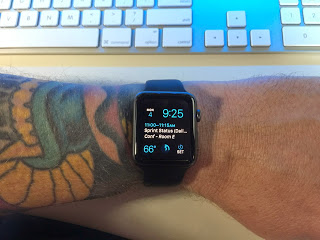
First read this article at iMore for more info on the issue.
In summary tattoos can interfere with the green light used for heart rate and security. My watch shipped the day this information started being discussed. I was worried that the issue would be bad enough for me to have to return the watch. I probably would have just turned off several features and kept it. But, I really did not want to have to make that choice.
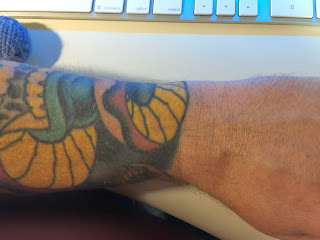
For me, the tattoo issue seems to be no big deal. It could be because of the inks my artist used, or more likely because of where the watch sits on my arm. There is a patch of yellow right where the watch naturally sits on my arm.
I have had no issues that I think were caused by my tattoos. It is possible that it is detecting my heart rate incorrectly. But, it seems consistent with values I have gotten from other sources.
I have had my watch lock while on my wrist twice. The first time was while using the lawn mower. Sweat was involved and I think the watch may have been too loose. The second time was while sitting idle on the couch, but I had my arm in a weird position and the watch was being pushed away from my arm.
Setup
Pairing was easy, I chose to activate all my apps, and this may have been a mistake. The first 20 min with the watch were slow and irritating. I think the phone was copying info to the watch, but there was no clear indication that this was happening. I got frustrated with things not working and left it alone for about an hour. The next time I tried to use it everything worked great. The setup process needs some work.
Everyday use
I have only had the watch for one weekend, so this can't really be a full review. However I have found the following things to be true:
It is a great fitness tracker.
I need to calibrate it better for my stride. But so far the way it tracks 'Active Calories' and reminds me to be more active is really helpful.
It is really good at notifications.
It is going to take some time to configure the correct set of notifications I want to go to the watch. I only want 'Important' items to show up there. I only want sound in some rare cases. etc... I will be tweaking these things until I find the right balance. Letting everything through would be awful.
It is good at being a watch.
I like having a watch on. At a glance information without pulling out my phone. I wish it had a mode where the time was always visible without the battery cost. Perhaps a future version will do a better job of detecting the wrist turn.
Apps
Some are pretty slow. Some don't really seem that helpful. For instance, there is a Yelp app on the watch, but It doesn't seem to support checking in, which is pretty much the only reason I would use Yelp on my watch. There are other instances of this. I've already removed several apps.
The Apple Watch, the iPhone 6, and the iPhone 6 Plus
On Tuesday, while we were having a blast in the Magic Kingdom, Apple announced the new iPhone 6 and iPhone 6 Plus. Like everyone else that was following along with the rumors and leaks, I knew what to expect with the new phones. They look like great upgrades especially when combined with iOS 8. I watched the keynote sitting in the lobby of the Wilderness Lodge and I ordered an iPhone 6 Plus Friday morning as we were leaving Disney World.
Apple also announced the long rumored Apple Watch. For me, the watch is more interesting than the new phones. I like the idea of glancing at my wrist to see if something requires more attention. I'm curious about the health tracking abilities and how they will enhance what I'm already getting from the motion co-processor in the iPhone 5S. I'm even intrigued by the tap based 'intimate' communication interface that was shown. Looking forward to trying the watch out and seeing how it evolves in future iterations.