Whats up with Coffee
For the longest time I did not drink coffee at all. I drank soda, I enjoyed tea, but I didn't like coffee. I would watch everyone line up at the coffee maker in the morning, and wonder why they liked it. I told myself it was just addiction driven consumption. Certainly there is some of that, but obviously I was being silly.
Over the last few years I started getting the occasional sweet drink at StarBucks. I would get the occasional lattes, mochas, and Frappuccinos. And, eventually I decided to try a cappuccino. That was the thing that finally got me. I started to love the creamy, rich, sometimes chocolatey drink. As I slowly reduced sugar in my diet, I increased the number of cappuccinos I would get. In the before times, I was getting a small cappuccino almost every day of the week at lunch.
Around the time we started working from home, I started making coffee at home. I started with the Hario V60, a hand grinder, and an electronic scale.
Watch on YouTube
I normally make some version of a pour over, or I'll make French Press, and lately I make the occasional AeroPress. I make one cup at a time. I have 2-4 cups a day, probably too much.
I find that I prefer medium roast blends of coffee. I really like a Harris Teeter Kona Blend and my current favorite is Charleston Organic.
Now I need another cup.
Watch on YouTube
Brain Dump
I was thinking about a few blog entries, but they were all small. So, I'll combine them into one big mess.
3D Printers
I was an early adopter of 3D printers. My 2nd printer was a Makerbot, but Makerbot stop focusing on consumer printing and stopped supporting their older printers. I will never buy anything from them again.
Today there are so many amazing options available. The technology has gotten cheaper and easier to work with. I have been considering buying one of a couple of different printers.
I just ordered the Prusa. It costs more than the ender, but has a few more features and good support. Its a kit that I will have to build. Should be fun.
8-Bit Madness
I'm a nut for old computers and old computer games. I've been pretty excited to follow the progress of the Commander X16. This is a new retro inspired computer. The idea is that you can write software and work with a simpler easy to learn, but more modern, computer.
It should be easy to port old C64 code and make some amazing new things as well. This computer is being created by a team of people, but the 8-Bit Guy is the driving force.
He has a great series on the history of Commodore. I have watched it a few times.
RSS Feed changed
I changed the blog rss feed from Atom.xml to JSON Feed. If you were using the old feed, you will likely need to delete and re-add with the new one. I highly doubt many people I know would even use RSS, but thought it was worth mentioning, just in case.
I changed it because the JSON feed is easier to deal with and the reader I use handles it fine.
Defaults to case insensitive
So this has bit me twice in the last week. Once for work and once on personal projects. When my mac updated to use APFS a few releases ago. It chose the most compatible option and is case-insensitive. Which is wrong for any one developing code and deploying on linux or unix based case sensitive systems.
Mac Disk Utility format options
I can change this, but I would have to reformat and rebuild my system. So I'll likely not change it till I get a new machine.
I Give Up
I tried for so long to only game on the Mac. And, it is possible. There are some great games on the Mac. But, so many games are never ported, or are ported badly. Many others that used to work, no longer work, due to the 64 bit transition.
So I bought an Alienware R8 with a 2070 Super. It's not top of the line, but it can play games. I won't be using it for much more than that.
I'm really curious to see what happens with Apples transition to Arm based Apple Silicon. But, for now I'll be doing most of my gaming on a PC again.
Fun to Learn
I haven't been keeping up with the latest changes to Swift and the iOS. This has been keeping me from updating existing apps on the store. I have also wanted to update and bring some of my old apps back. I have a few ideas for new apps that I would like to create as well. So, I have been spending a bunch of time working on improving my iOS development skills, and getting up to speed on the current state of iOS development.
Wow, things have come along way. I was never a big fan of Objective C. It has some great features that really helped, but it always felt old and cumbersome to me. Swift seemed like the future right from the beginning. It feels like a modern language to me. The new versions of Swift have improved and evolved the language in wonderful ways. Perhaps more importantly, I enjoy writing code in Swift.
I have been using a Paul Hudson's Hacking With Swift site to get back up to speed. I think his teaching style and pragmatic approach is very compatible with my own coding preferences. He has a large number of guided videos on YouTube that are great when combined with the content on his site and in his books. He also does an amazing job at updating everything for the latest language updates.
DispatchQueue.global().async {
	do {
		let data = try Data(contentsOf: url)
		let downloadedData = try self.decode(type, from: data)
		DispatchQueue.main.async {
			completion(downloadedData)
		}
	} catch {
		print(error.localizedDescription)
	}
}
I have headed down this path before. What makes it different this time?
Honestly I don't know, but it feels different. I feel more committed to getting something new released this time. But, only time will tell. Will I stick with it, and dedicate my free time to it? I intend too, and I hope I do. There is nothing like the feeling of setting a difficult goal for your self and reaching it.
3rd Gen iPad Pro
Apple just released several great updates to existing products. The most significant update was to the iPad Pro. I have been a huge fan of the iPad Pro and the Apple Pencil since the first version was released. This update has refined and improved the iPad Pro in almost every way.
Specs
- 11 inch, and 12.9 inch screens
- Both available in silver and space gray
- Sizes for both in 64GB, 256GB, 512GB, and 1TB
- Improved speakers and microphones
- Home Button replaced by Face ID camera system
- Not a feature but worth mentioning: Headphone jack removed due to reduced thickness.
- USB-C connector replaces Lightning conector
- 18W power brick included
- A12X 64-bit processor
- Improved cameras
What I ordered
I got the 12.9 inch, space gray, 256GB LTE iPad Pro. This is the first time I have paid extra for the LTE option, and I only plan on using it when I need extra conectivity. I wanted to get more storage this time, but I could not justify the added price for it. I was already ok with the larger iPad Pro, but this generation physical size actually got smaller while keeping the same screen size. It feels perfect now.
I also got the new Apple Pencil, which charges wirelessly while connected to the iPad case via magnets. The pencil is a little smaller. It has a new double tap feature for tool selection in apps that support it. Also, there is no longer a cap to lose. Pairing is done wirelessly when the pencil is connected to the side of the iPad.
I once again got the Smart Keyboard. Its a little better this time around, but still not perfect.
Pros
- This is a nearly perfect device. It feels great, it looks great, I love using this device.
- The pencil is always charged and I don't have to worry about losing the cap.
- Application updates are rolling out with support for the pencil double tap.
- This thing sounds amazing, not as good as the HomePod, or a real stereo system. But, for travel this will be a great way to play music.
- iOS keeps getting better.
- How fast is this thing, It handles everything with ease.
- With USB-C the dongles I already purchased for my Macbook Pro can now be used with the iPad as well.
Cons
- This is an expensive luxury item. I wish it was cheaper. I would have bought more storage if it was cheaper.
- Why does it come with the short USB-C cable. They sell a longer cable, it needs the longer cable.
- No headphone jack is a bummer, but understandable. I can't remember the last time I plugged headphones in to my iPad.
- iPad does not support external storage connected via USB-C. There are apps that can do this, but this should be supported by the OS directly. I'll be shocked if this is not in the next version of iOS.
- I should be able to develop iOS apps on iOS. The OS upgrades that are needed to support this take iOS from a Mac companion to a Mac replacement.
- No mouse and trackpad support. I need a cursor sometimes.
- The Apple Smart keyboard does not have media keys. I want the standard set of keys.
My CPO Tesla Model S
I have been watching and drooling over Tesla since they first started selling cars. I believe that electric cars are the obvious path forward. As battery technology improves and becomes cheaper there will be no reason to have a fossil fuel car other than for entertainment.
Tesla has been leading the move forward with a top down approach to electric vehicles. Selling luxury vehicles now with a long term plan to start selling reasonably priced vehicles later. We don't know for sure if this plan will work long term. But, I think it is already working. Tesla looks to be heading toward a profitable position as their latest manufacturing line is ramping up.
One area where Tesla has become the clear leader is with the Super Charger network. There are Tesla charing stations located along most major road systems all over the world. This gives their cars an easy and quick way to recharge that few other systems can compete with.
I originally signed up a Model 3 reservation, but decided to get a similarly priced Model S instead. Mostly because I'm impatient. But, also because I was very unsure of the minimal interface of the Model 3. I've been re-thinking that lately. But for now I'm sticking with my Model S.
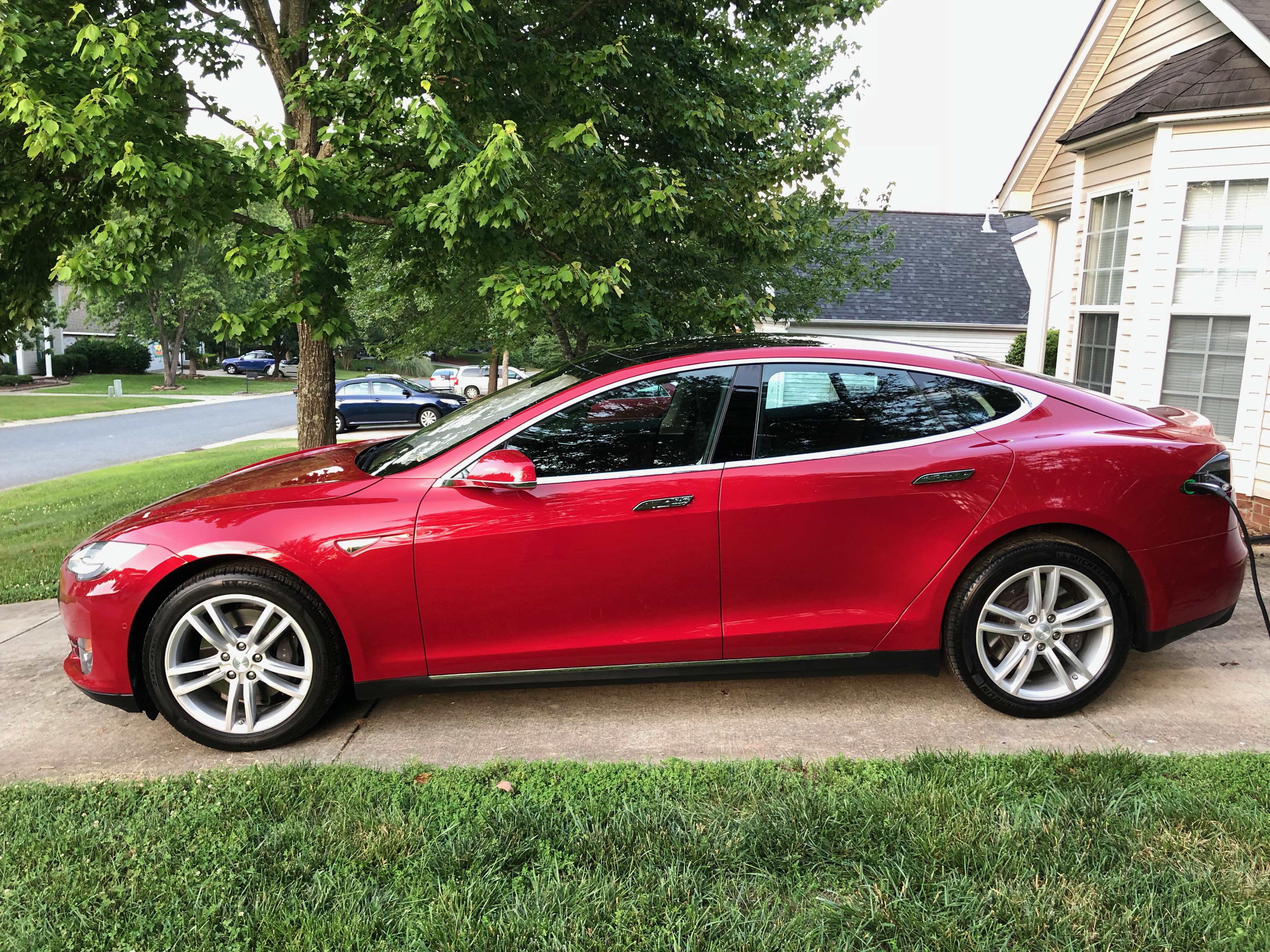
Our Car
I only had a few must have options on my list:
- Premium Audio System
- Auto Pilot Hardware - would have loved version 2, but for the price I was ok with version 1.
- Air Suspension
- 19" wheels. The larger 21's aren't worth the hassle and cost.
- I wanted Silver, Gray Metallic, or Blue for the color. But, I ended up with Multi coat Red.
Our car also has:
- Power Lift gate
- Sunroof
Purchase Experience
You order online and their web site works pretty well. I did have an issue with the car that I originally chose selling out from under me. I called a sales rep and he helped me find a non yet listed car in California that had everything I wanted.
I did have to pay, as part of the purchase price, to have the car shipped to North Carolina. It took about a week to ship.
All of the purchase forms and required documents were all handled via the website. Even the trade in info was entered via the web. For the most part this was a good experience. However, there were some issues with communication from Tesla. They sent us the final loan info right before the delivery. We had to scramble to get things notarized and completed. Due to out dated laws in NC Tesla only has a showroom here. They can't legally sale cars here directly. So, we can't sign and handle the loan info at the delivery. It's silly and needs to change. It made things stressful.
Delivery
Our delivery was delayed a day due to a crack in the wind shield. This would normally have been fine, but Tesla did not call me to let me know this. I only learned about this when I was calling for another issue. Fortunately it was only a single day delay. They replaced the windshield at no cost.
Tesla does pretty well at training people during the delivery. They go over everything and let you ask any questions you might have. I pretty much knew everything that was covered already. You can spend some time on Youtube and get in depth information on every aspect of the car.
In less than an hour we were driving home.
We did have one issue with the delivery that was quite annoying. When we handed over the title for our old Prius, we had not gotten it notarized. I missed this completely. The delivery person also missed it. So they had to send it back to us to get notarized.
Charging
Initially we were charging the car at home with a 110 standard plug. This gave us about 4 miles of range per hour. This is not enough to make up for a normal day of driving for me. Luckily it only took a week to get a new 240v dryer style plug installed in the garage. With this I can charge up my normal daily use in a few hours. I regularly get around 30 miles of range per hour with this connection.
We have used the Super Charger network a few times. It's been great, with some planning you can go pretty much anywhere you need with only a little more time spent charging than you would need to spend at a gas station. Your going to want to stop for food and bathroom breaks anyway. Getting used to the difference is the only real problem.
Driving
Driving this car is like a dream. Our car is a Model S 85. We do not have the performance or dual motor options. It's not nearly as fast as the newer tricked out cars. But, it is crazy fast and easy to drive. When you need power its there. No hesitation, no struggle.
All of the included technology makes this a great driving experience.
Conclusion
It's only been a few weeks, but so far I have to say I'm ridiculously happy with this car. It's like having two car payments, and the insurance is a bit more. I've never had more fun driving a car.
Who knows what will happen in a few years I may trade it in on a new or used Model 3. We need more people to buy electric cars and to drive the price down. Don't fight the future, embrace it, and have a good time.
HomePod Mini Review
So I got a HomePod. I did not previously own any of the other dedicated Voice assistant devices. I could talk to my phone, and my watch, and my TV. But, the power of a dedicated, always listening assistant is just more useful. I have used the Amazon device in other environments and thought it was pretty cool. But, I'm all in on the Apple eco-system.
My short review is it's great. I think it will get significantly better in the near future.
Sound Quality
This small speaker sounds great. It does not sound better than my huge Stereo. I won't be using it when I watch movies, but it is ideal for casual music in the kitchen or in the bedroom. When cooking or preparing to start or end the day is when it shines.
Siri
Say things like:
- "Hey Siri play some music."
- "Hey Siri shuffle Steely Dan."
- "Hey Siri start a timer for 10 minutes."
- "Hey Siri whats the weather for tomorrow."
- "Hey Siri turn all the lights off."
- "Hey Siri set the thermostat to 68."
- etc....
Siri will most of the time hear you correctly and do what you want. But, you need to know how to ask for what you want. Trial and error will eventually train you. All the same issues you have with Siri on the phone are here. Contextual conversation often fails. Siri can't do some things that other devices can. You can only have one timer at a time. You can set alarms and reminders.
Siri needs more 3rd party APIs. Continue to develop and extend the limited apis already added to Siri. Add new apis. Let Spotify decide whether to develop an integration. Let Overcast develop an integration, etc... I'm sure this will happen. I wish it would happen faster than Apple typically moves.
Siri needs to be consistent everywhere Siri can be used. The phone should be no different than the desktop, which should be no different than the HomePod.
Siri also needs to support multiple users on the HomePod. I'm sure Apple wants this to be based on the person speaking. Not asking for a new profile to be active. However, profile switching would be good enough for now.
Conclusion
If you use Apple Music. Don't mind talking to Siri occasionally on your phone. Have a place in your home where a good speaker would be nice. Then sure give it a try. Don't buy it based on the possibility of future features. It does more than enough to justify the purchase. If you already have Echo and are happy with it, maybe skip the HomePod.
I liked it so much that I already bought a second one.
8 Bit Madness
Electronics and old-school computing is one of the many hobbies I find myself returning to over and over. Of course I'm old enough to have been right in the middle of everything that you might call "old-school computing". I had a great deal of experience with the Tandy Model 1, and the Commodore 64. I went to my friends house and drooled on his Apple II. I spent way to much time typing programs into these machines. These early experiences are what inspired me to become a Software Developer.
I recently stumbled on a, new to me, YouTube channel "The 8-Bit Guy", the videos here are all about these old computers and their restoration. He also has a channel about synthesizers called "8-Bit Keys" thats pretty cool. Watching these videos has re-kindled my desire to work with electronics again. Check them out!
I have to admit I've thought about trying to buy a working Apple IIe or maybe even an Amiga. I don't need these - I have plenty of other projects to keep me busy.